
How to Use Detailed Results by Subpopulation
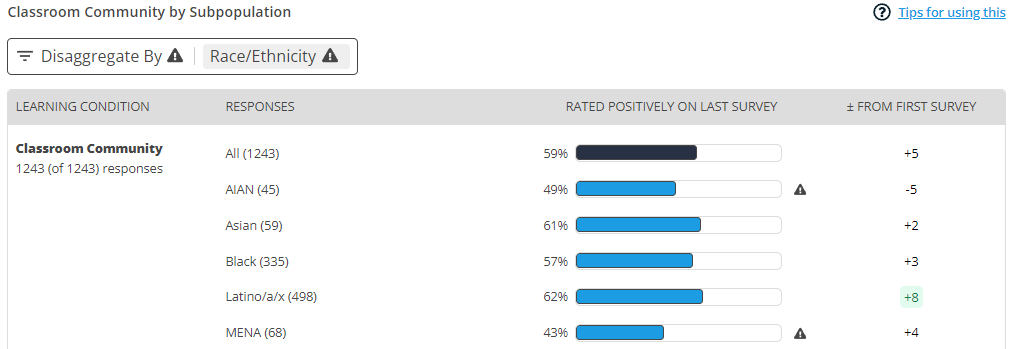
Detailed Results by Subpopulation provides a detailed view into each learning condition. It includes:
- The number of responses recorded for at least one item in each condition
- The most recent survey results as an average for each condition or by each individual item
- Change from the first survey to the most recent when the survey is completed more than once
- The option to disaggregate data by gender, race/ethnicity, focal group (if selected), and basic needs security (Ascend only)
Below are a few tips for using the Detailed Results by Subpopulation:
- Check for student experience gaps. The disaggregation menu allows you to view learning condition results by gender, race/ethnicity, focal group (if selected), and basic needs security (Ascend only). Student experience gaps of ten or more percentage points are flagged with a caution icon ⚠. The same icon ⚠ appears next to the dropdown menus to draw your attention when gaps exist. To address these gaps, click Learn strategies next to the condition name.
- Examine results by item. Dissagregate by Question in the dropdown to see results for each individual item. You may also opt to view disaggregated data for each item. This information can give you a sense of what items are driving the overall changes you see. For example, if you notice that equity gaps are particularly strong for a given item, you might ask why students from different backgrounds may be answering that question differently.
- Review Open-Ended Response. Respondents may explain their answer for one question at random. These responses provide additional insight and can often be very affirming. Note, open ended responses only appear In Class/Group reports.
Related articles
- How are data calculated in reports?
- What does "rated positively" mean?
- How are responses to negatively worded questions displayed in reports?
- How are survey results disaggregated?
- Why don’t I see disaggregated data for a particular group?
- What does “basic needs security” mean in Ascend?
- How do I know which participants completed the survey?
- What do we do with missing data (when participants skip a survey)?